How to Handle Customer Complaints: A Step-by-Step Process
A step-by-step process for handling customer complaints - from setting up channels to tracking resolution and following up.
Most unhappy customers never say a word. They just leave. Only 4% actually complain to your company. That means every complaint you receive represents 25 more people who felt the same way but didn't reach out.
Handling customer complaints well requires a repeatable process - not just good intentions. When your team knows exactly what steps to follow, complaints get resolved faster and more consistently. 63% of customers would switch companies after just one bad support experience. A clear process keeps that from happening.
This guide walks through a step-by-step complaint handling process you can adapt for any team size. For ready-to-use reply templates, see our customer complaint response templates.
Step 1. Set Up Clear Complaint Channels
Before you can handle complaints, customers need a way to reach you. Give them more than one option.
According to CM.com, the most popular channels break down like this:
- Email - 69% of customers prefer it
- Phone or face-to-face - 33-39%
- Chatbots - 21%
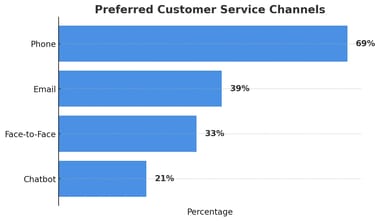
Data: CM.com, 2023
Many customers use more than one channel depending on the issue. A shared inbox pulls complaints from email, web forms, and your customer portal into one place. That way nothing gets lost and your team can see every open complaint at a glance.
Step 2. Acknowledge, Thank, and Apologize
When a complaint comes in, respond quickly. The goal is to let the customer know you received their message and take it seriously.
A good first response includes three things:
- Thank them for bringing the issue to your attention
- Apologize for the trouble it caused - our apology email templates give ready-made wording
- Set expectations for what happens next
Practice active listening. Restate the problem in your own words to confirm you understood it. A genuine "thank you for letting us know" goes further than most people expect.
Speed matters here. 67% of customers expect ticket resolution within three hours. Even if you can't solve it that fast, acknowledge it within minutes.
Step 3. Log and Categorize the Complaint
Good records separate one-off issues from recurring problems. When a complaint comes in, log it with:
- Category - billing, product, shipping, service, etc.
- Severity - minor inconvenience vs. business-critical
- Channel - email, phone, portal, social media
- Customer history - first complaint or repeat issue?
Ask yourself: Has this come up before? Is there a pattern? Can we prevent it next time?
A help desk ticketing system makes this automatic. Every complaint gets a ticket, every ticket gets a category, and your team can spot trends over time.
Step 4. Agree on a Resolution

A key part of handling customer complaints is agreeing on a fix. Every customer has their own idea of a fair resolution. Take time to understand what they expect. Then either accept the request or offer a reasonable alternative.
Sometimes front-line agents need to escalate to a supervisor. That's fine - but don't leave the customer waiting. Long hold times damage the overall support experience. Set up clear escalation paths so approvals happen fast.
Once you reach agreement:
- Enter the resolution into your system
- Send a confirmation email summarizing what was agreed
- Include any next steps or timelines
This protects both sides and prevents misunderstandings later.
Step 5. Empower Your Team to Handle Complaints Directly
Few phrases frustrate customers more than "Sorry, it's not company policy." Policies matter, but they should be guidelines, not walls.
Give your team the flexibility to resolve complaints within broad guardrails. When agents can offer a solution on the spot, two things happen:
- Customers feel valued - their problem gets solved without delays
- Agents feel empowered - they take ownership instead of passing the buck
Happy employees make happy customers. Set spending limits, define which refunds or credits agents can approve on their own, and trust them to make good calls.
Step 6. Follow Up Within 24-48 Hours
Whether a complaint is closed or still being worked on, follow up directly within 24-48 hours.
A good follow-up:
- Shares any progress or updates
- Confirms the resolution if the issue is closed
- Asks if there's anything else they need
Use canned response templates to keep follow-ups consistent. If the resolving customer complaints, it carries even more weight.
If the issue requires customers to take action, add clear guidance to your knowledge base. Let them know you've spotted the problem and are working on it. When a fix is ready, notify them through your customer portal or email.
Step 7. Track Metrics and Improve
A complaint handling process isn't set-and-forget. Review your metrics regularly to find weak spots.
| Metric | What It Measures | Why It Matters |
|---|---|---|
| First Response Time | How fast you acknowledge a complaint | Faster responses improve satisfaction |
| Resolution Time | How fast you fully resolve it | Shows your team's efficiency |
| CSAT Score | Customer rating of their experience | Direct feedback on service quality |
| Resolution Rate | % of complaints successfully resolved | Measures overall effectiveness |
Tools that help your team handle complaints at scale:
- Help desk software: A shared inbox organizes and tracks requests so nothing slips through.
- CRM systems: CRMs keep all customer interactions in one place. Track history and personalize each response.
- Knowledge base: A self-service knowledge base deflects common complaints before they reach your team.
- AI tools: AI in customer service can flag urgent tickets, suggest responses, and help your team handle volume spikes.
Build Your Process with SupportBee
SupportBee gives small teams the tools to handle customer complaints without the complexity of enterprise software. You get a shared inbox for managing tickets, a knowledge base for self-service, and a customer portal where customers can track their own requests.
Start your free 14-day trial - no credit card needed. Plans start at $20/user/month.