What Is a Customer Portal? A Complete Guide
Learn what a customer portal is, its key features, and how to build one. Covers benefits, real-world examples, AI trends, and best practices for support teams.

A customer portal is a secure, self-service platform where customers manage their accounts, track support requests, and find answers on their own.
In a Statista survey, 88% of customers said they expect brands to offer a self-service portal. This makes portals a baseline expectation, not a bonus feature.
This guide covers what a customer portal is, why it matters, core features, real-world examples, and how to build one.
What Is a Customer Portal?
A customer portal is a private, web-based hub that connects to your support ticket system. It gives each customer a personal view of their interactions with your company. Through the portal, customers can:
- Submit and track support tickets
- View past conversations and resolutions
- Search knowledge base articles and FAQs
- Update account details and preferences
- Download documents and invoices
Think of it as a personal dashboard for every customer. They log in, see their history, and handle routine tasks without sending an email or making a call.
Other Names for Customer Portals
You may hear customer portals called by other names. These terms overlap but carry slight differences:
- Customer service portal - emphasizes the support and service function (the most common synonym)
- Customer care portal - friendlier framing, common in B2C and consumer brands
- Online customer portal - emphasizes the web-based or SaaS delivery model
- Customer support portal - synonym used in help desk and ticketing contexts
- Self-service portal - emphasizes the DIY aspect of finding answers
- Client portal - common in B2B and professional services (law firms, agencies, consultants)
- Customer dashboard - focuses on account data and metrics
- Partner portal - designed for B2B partners rather than end customers
Most modern portals combine elements from all of these. The core idea stays the same: give customers a secure space to help themselves.
Customer Portal vs. Knowledge Base
A knowledge base is a library of help articles anyone can read. It includes how-to guides, FAQs, and product documentation.
A customer portal is a private, authenticated space. Customers see their own data -- tickets, order history, and account details.
Many customer portal solutions include a knowledge base as one component. But a knowledge base alone doesn't make a portal. The portal adds personalization, ticket tracking, and account management on top.
What Is a Customer Self-Service Portal?
A customer self-service portal is a portal designed to let customers solve problems on their own. It combines a knowledge base, ticket tracking, and account tools in one place. Customers search for answers, check order status, or update billing details without contacting support.
The term "self-service portal" highlights the goal: fewer tickets, faster answers. Every action a customer takes in the portal is one your team doesn't have to handle. For small teams, this is the difference between keeping up and falling behind.
Why Are Customer Portals Important?
Customer portals solve a problem that email and phone support create: dependency. Without a portal, customers rely on your team for every status update, invoice, and follow-up. Understanding what customer support means and why it matters helps explain why portals exist in the first place: they shift routine work from agents to customers.
Here's why that matters:
- Customers want speed. A portal gives instant access to information that would otherwise take hours to get via email.
- Support teams burn out. Repetitive "where's my ticket?" questions waste agent time. A portal eliminates them.
- Scaling support is expensive. Hiring more agents for growing ticket volume is costly. A portal absorbs volume without adding headcount.
- Data stays scattered. Without a portal, customers dig through email threads to find past conversations. A portal keeps everything in one place.
Companies that launch customer portals typically see a measurable drop in support ticket volume. We wrote about this in detail in our guide on how customer portals reduce support tickets.
Key Features of Customer Portals
Ticket Management
Customers submit new requests and track existing ones in real time. They see the status of each ticket without asking "did you get my email?" If self-service doesn't solve their issue, the portal routes them to a live agent.
Support History
Every past interaction lives in one place. Customers reference previous solutions without starting over. Agents get full context without asking customers to repeat themselves.
Knowledge Base Access
Self-service articles, FAQs, and documentation live directly inside the portal. 70% of customers expect self-service options on company websites. A built-in knowledge base lets them find answers before creating a ticket.
Account Management
Customers update contact information, view invoices, manage billing, and adjust preferences. No support call needed for routine account changes.
Secure Authentication
Portals protect sensitive data with secure login methods. Options include password-based authentication, private access links, and single sign-on (SSO). Encryption and access controls keep customer data safe.
Custom Branding
A well-designed portal matches your company's visual identity. Consistent branding builds trust and makes the portal feel like part of your website, not third-party software.
Mobile Access
Customers access portals from phones and tablets. A responsive design that works on any screen size is essential. Desktop-only portals frustrate mobile-first users.
Notifications and Alerts
Automatic email or in-app notifications keep customers informed when their ticket gets a reply or changes status. This cuts down on repeat visits and follow-up emails.
Benefits of Customer Portals
For Customers
- 24/7 access. Find answers and check ticket status at any hour, not just during business hours.
- Faster resolution. Self-service skips the queue. No waiting for email replies or sitting on hold.
- Full transparency. See exactly where each request stands. No guessing whether anyone is working on it.
- Continuity. All interactions in one place. No explaining the same situation from scratch every time.
- Control. Update account details, download invoices, and manage preferences independently.
For Businesses
- Lower support volume. Customers handle routine questions themselves. Your team focuses on complex issues.
- Reduced costs. Self-service costs a fraction of live support. Every ticket deflected to the portal saves money.
- Higher satisfaction. Customers who solve problems quickly stay loyal. Happy customers stick around longer.
- Scalability. A portal handles unlimited self-service interactions. Your team cannot.
- Actionable data. Track what customers search for, which articles they read, and where they get stuck. Use that data to improve your product and support content.
Real-World Customer Portal Examples
Customer portals look different across industries. Here are common use cases:
SaaS and Software Companies
SaaS portals let users submit bug reports, request features, and track issue status. Customers view their subscription, billing history, and usage data. Many SaaS portals include a knowledge base with API docs and setup guides.
E-Commerce and Retail
Online retailers use portals for order tracking, returns, and invoice downloads. Customers check shipping status, start exchanges, and view past orders. This cuts "where's my order?" emails fast.
Professional Services
Accounting firms, law firms, and agencies use client portals to share files securely. Clients upload docs, review work, and track project milestones. The portal replaces scattered email attachments with organized storage. For a detailed comparison of portals built for this space, see our guide to the best client portal software for accountants.
Healthcare
Patient portals let users schedule appointments, view test results, request prescription refills, and message their care team. These portals must comply with privacy regulations like HIPAA.
B2B and Manufacturing
B2B companies use portals for order management, technical documentation, and support case tracking. Customer groups let multiple employees from the same company view shared tickets and account data.
How to Create a Customer Portal
Building a customer portal doesn't take months of custom development. Modern tools let you launch one in days - sometimes minutes.
Step 1: Define Your Goals
Start with the problem you want to solve. Common goals include:
- Reducing repetitive support emails
- Giving customers 24/7 access to ticket status
- Centralizing knowledge base content
- Letting customers manage their own accounts
Your goals shape which features matter most.
Step 2: Choose Your Platform
You have three main options:
- Built-in portal from your help desk. Tools like SupportBee include a customer portal as part of the help desk. Setup is fast and integration is built in.
- Standalone portal software. Dedicated platforms that connect to your existing systems via APIs.
- Custom-built portal. A development team builds it from scratch. Most flexible, but slowest and most expensive.
For most small and mid-sized teams, a built-in portal from your help desk is the fastest path to value. For a full comparison of 10 tools with pricing and tradeoffs, see our guide to the best customer portal software.
Step 3: Configure Branding and Access
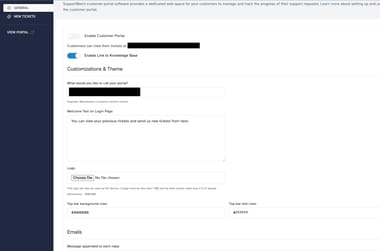
Make the portal match your brand. Set up your logo, colors, and domain. Pick your login method: password, private links, or SSO.
Step 4: Build Your Knowledge Base
A portal without self-service content is incomplete. Write articles that answer your most common support questions. Focus on topics that generate the most tickets. Our knowledge base software makes this easy.
Step 5: Set Up Customer Groups (for B2B)
If you serve businesses, customer groups let you organize users by company. When one employee submits a ticket, others from the same organization can see it.
Step 6: Launch and Promote
Share your portal link in email signatures, auto-replies, and on your website. Include it in every support response. Customers won't use what they don't know about.
The Future of Customer Portals: AI and Automation
Customer portals are evolving fast. AI and automation are reshaping what portals can do.
AI-Powered Search and Suggestions
Customers describe their problem in plain language. AI finds the best answer. Some portals suggest articles before a customer even finishes typing.
Automated Ticket Routing
AI analyzes incoming tickets and routes them to the right team. This speeds up resolution and reduces manual triage work.
Chatbots Inside the Portal
AI chatbots handle common questions inside the portal. They fix simple issues on the spot and pass complex ones to human agents with full context.
Predictive Support
AI spots patterns in support data and flags issues before customers report them. If multiple customers hit the same bug, the portal can display a notice or workaround.
Personalized Experiences
AI tailors the portal to each customer. Returning visitors see relevant articles based on their history. New users get onboarding guides. Power users see advanced docs.
These trends are already shaping how AI in customer service is changing support. Portals that adopt AI early will deliver faster, smarter self-service.
How to Choose the Right Customer Portal Platform
1. Ease of Setup
Avoid platforms that need heavy development work. SupportBee's customer portal can be set up in minutes from your settings page.
2. Integration with Existing Tools
Your portal should connect with your help desk, CRM, and other tools. Data silos defeat the purpose. Look for native integrations or a solid API.
3. Customization Options
The portal should look like your brand. Custom logos, colors, and domain mapping build trust with customers.
4. Security Features
Customer data is sensitive. The platform must offer encryption, secure login, and compliance with rules like GDPR and SOC 2.
5. Built-In Knowledge Base
A portal without self-service content misses the point. Look for a built-in knowledge base so customers find answers before submitting tickets.
6. Pricing Model
Some platforms charge per agent, others per customer, and others by feature tier. Review the pricing before you commit. Check for hidden costs around storage, users, or API calls.
7. Mobile Experience
Test the portal on mobile devices. A desktop-only portal will frustrate your customers. Responsive design isn't optional.
Best Practices for Customer Portals
Keep Navigation Simple
The most common actions should be obvious. Submit a ticket, check status, and search articles - these three tasks should take one click each. Don't bury them under menus.
Maintain Your Knowledge Base
A portal is only as useful as its content. Outdated articles frustrate customers and erode trust. Assign someone to review and update articles on a regular schedule.
Use Customer Groups for B2B
Customer groups let you share ticket visibility across an organization. When one team member submits a ticket, others from the same company can see progress and add context.
Enable Private Access Links
Not every customer wants to create an account. Private links let them access their tickets without logging in. This removes friction and boosts adoption.
Track Usage Metrics
Track which features customers use and which they skip. Monitor article views, search queries, and ticket rates. This data shows what works and where to improve.
Collect Customer Feedback
Ask customers about their portal experience with short surveys. Find friction points and fix them. Even a one-question rating after a ticket closes gives useful signal.
Promote the Portal Actively
Add portal links to email signatures, support responses, and your website footer. Train your support team to direct customers to the portal for status checks and common questions.
Measure Customer Satisfaction
Track satisfaction scores before and after launching your portal. Compare resolution times, ticket volume, and customer feedback. Use this data to justify continued investment.
SupportBee's Customer Portal
SupportBee's customer portal software gives your customers a clean, branded space to manage their support interactions.
What you get:
- Custom branding to match your website
- Private links -- no login required for customers
- Ticket submission and tracking
- Full support history for past interactions
- Customer groups for B2B organizations
- Integration with shared inbox and knowledge base
Setup takes minutes. Share a link with customers, and they can see their tickets and submit new requests right away.
Start your free 14-day trial -- no credit card required.
Frequently Asked Questions
What is the purpose of a customer portal?
A customer portal gives customers a self-service hub. They manage their account, track requests, and find answers without contacting your team. It cuts support volume and gives customers faster access to information.
What is another name for a customer portal?
Common alternatives include customer service portal, customer care portal, online customer portal, client portal, self-service portal, customer dashboard, and support portal. The name varies by industry. The core idea is the same: a private space where customers access their own data and get help.
What is a customer service portal?
A customer service portal is the same thing as a customer portal, with the naming emphasizing the support and service function. It is a secure, self-service platform where customers can submit support tickets, track their status, browse the knowledge base, and manage their account details. The "service" qualifier signals it is used primarily by support teams rather than sales or partner teams.
What is an online customer portal?
An online customer portal is a web-based self-service hub that customers access through a browser, with no software to install. Modern customer portals are all online portals - the distinction is mostly redundant today, but the phrase is still common when comparing portals to older offline or on-premise systems.
What is a customer care portal?
A customer care portal is a customer portal aimed at consumer support and post-purchase service. The "care" framing is used most often by B2C brands in retail, telecom, healthcare, and consumer services - businesses where the relationship with the customer continues after the sale through warranty support, account questions, and service requests.
What is an example of a customer portal?
A SaaS company might offer a portal where customers submit bug reports, track ticket status, and read product docs. An e-commerce store might provide a portal for order tracking, returns, and invoice downloads. Banks use portals for account management, statements, and secure messaging.
What is a customer portal login?
A customer portal login is how users access their private portal. Methods include email and password, single sign-on (SSO), or private access links sent via email. Private links let customers view their tickets without creating an account.
How much does a customer portal cost?
Costs range from free (basic tools) to hundreds per month for enterprise platforms. Most small business tools like SupportBee include a portal as part of their help desk pricing. Custom-built portals cost the most due to development and upkeep.
How do I set up a customer portal?
With modern tools, setup takes minutes. Choose a help desk with a built-in portal. Customize the branding, set up authentication, build your knowledge base, and share the link with customers. See our portal setup guide for step-by-step instructions.