Save Support Tickets to Notion Databases
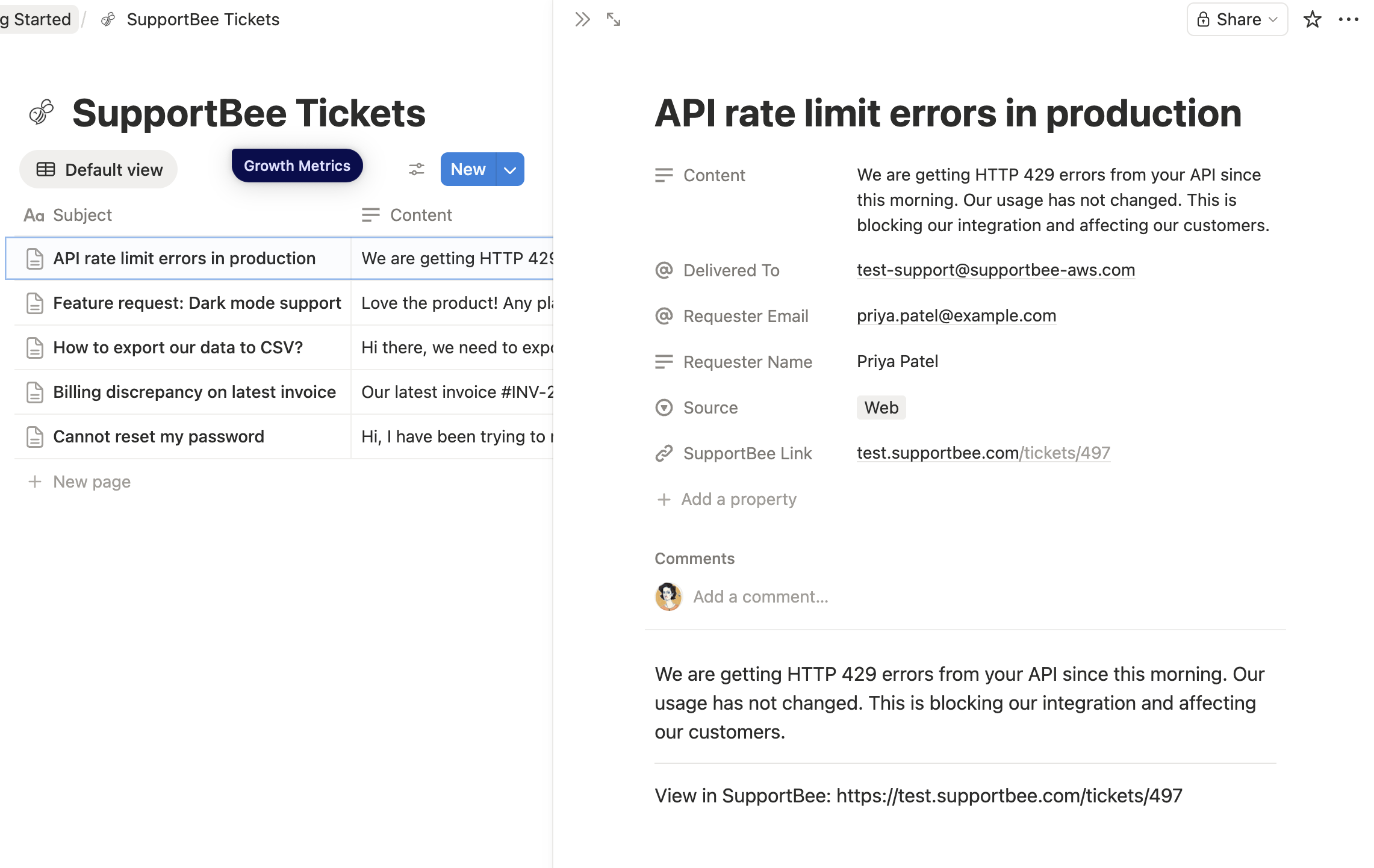
SupportBee's Notion integration sends support tickets to your Notion workspace automatically. Every new ticket, reply, or resolution gets saved to a Notion database — building a searchable record of customer conversations alongside your team's existing docs and projects.
Why Use a Help Desk with Notion
Notion is where many teams keep their docs, wikis, and project plans. Many teams also lean on it to capture how to structure customer-facing knowledge content. But it's not built for handling customer emails. There's no shared inbox, no ticket assignment, no collision detection, and no way to manage the back-and-forth of support conversations.
A dedicated help desk like SupportBee handles the customer-facing workflow: converting emails into trackable support tickets, assigning them to agents, and managing resolution. The Notion integration bridges the gap — your support conversations get archived in Notion where your team can reference them alongside product docs, meeting notes, and project plans.
This is useful when:
- Support patterns reveal product issues that your team tracks in Notion
- Customer feedback needs to be visible to product managers working in Notion databases
- You want a searchable archive of all support conversations in one place
- New team members need to learn from past support interactions
How the Notion Help Desk Integration Works
Once connected, SupportBee automatically saves ticket data to a Notion database. Each ticket becomes a row with:
- Ticket subject and content — The full conversation thread, including customer messages and agent replies
- Customer details — Name, email, and any context from previous interactions
Your team can use Notion's views (table, board, timeline) to organize and filter support data however they need. Build dashboards for common issues, create linked databases for product feedback, or search past tickets when similar questions come up.
Setting Up the Notion Integration
- Go to Admin → Integrations in SupportBee
- Search for Notion and click Add to My SupportBee
- Authorize SupportBee to access your Notion workspace
- Select the database where tickets should be saved
Setup takes a few minutes. SupportBee uses OAuth to connect, so there are no API keys to manage.
Note: Notion requires HTTPS for OAuth callbacks. In development, you'll need an HTTPS tunnel (like ngrok) to test the integration locally.
Building a Support Knowledge Base in Notion
The real value of this integration goes beyond archiving. With support tickets flowing into Notion, you can:
- Spot patterns — Filter tickets by topic or label to find recurring issues. If 20 customers ask the same question in a month, that's a product problem or a knowledge base gap.
- Feed product decisions — Link your support database to product roadmap pages. PMs see real customer language, not filtered summaries.
- Onboard faster — New support agents search past tickets to learn how the team handles common scenarios.
- Track resolution quality — Sort by response time or customer satisfaction to identify where the team excels and where it struggles.
Who Uses SupportBee with Notion
- Startups that use Notion as their internal wiki and want support data in the same place
- Product teams that need customer feedback flowing directly into their Notion planning databases
- Teams mapping their stack can see how help desks plug into project tools before deciding which integrations to enable
- Support managers who want reporting and analysis beyond what a ticketing system provides
- Remote teams where Notion is the central hub and support data needs to be accessible to everyone
SupportBee starts at $17/user/month and includes the Notion integration on all plans.






From our blog
Guides and comparisons to help you choose the right support tools.


Try the Notion integration free
Set up SupportBee in under five minutes. No credit card required.
Start Free Trial