5 Problems with Using Outlook as a Helpdesk
Learn the 5 biggest problems with using Outlook as a helpdesk and why growing teams need a purpose-built support tool.
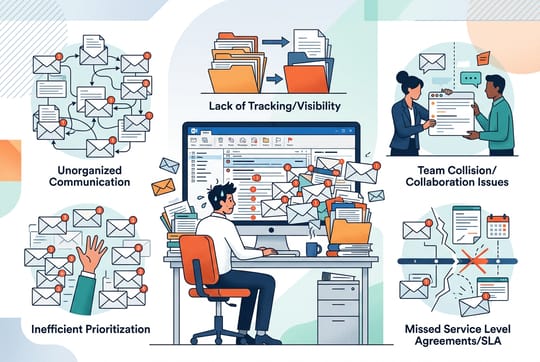
Small teams often start managing customer support through email. Outlook sits open all day, so why not use it for support requests too? That logic holds until your inbox hits a few dozen daily tickets. Then the cracks show. Emails slip through. Customers wait too long. Your team spends more time sorting messages than helping people.
Microsoft never designed Outlook to work as helpdesk software. It handles personal and business email well. But ticket management is a different job. Using Outlook for support is like cooking for a restaurant with a home kitchen. It works at first. Then orders pile up and things fall apart.
If your support quality is dropping or your team fights inbox chaos daily, you are hitting the limits of Outlook as a helpdesk. These problems get worse over time. They create bottlenecks that hurt your team and frustrate your customers. Knowing where Outlook falls short helps you decide when to move to a cloud based help desk.
Why Outlook Fails as a Scalable Support Tool
Outlook handles one-to-one email well. Send a message, get a reply, archive the thread. Customer support does not work that way. You deal with multiple agents, ongoing conversations, escalations, and patterns across hundreds of requests.
The moment you add a second person to a team inbox, complexity jumps. Who handles which email? Did someone already reply to yesterday's complaint? Outlook gives no answers to these questions. It was never built to. A team of two can manage with color-coded categories and quick chats. A team of five will struggle. A team of ten will drown.
Consider a real example. A SaaS company with eight support agents used an Outlook shared mailbox for two years. They lost track of emails weekly. Response times crept from hours to days. Three agents would sometimes work on the same ticket without knowing it. When they switched to a dedicated tool, first response time dropped by 60% in the first month.
The Lack of Accountability and Ownership
When every support email lands in a shared inbox, ownership gets murky. Outlook has no built-in feature for automatic email assignment. Someone must hand out tickets manually, or agents claim them on their own. Neither approach works at scale.
Without clear assignment, emails sit unclaimed. Each agent assumes someone else will handle it. Or two people start working on the same issue at the same time, unaware of each other. The result: neglected customers or wasted effort.
Colliding Emails and Duplicate Responses
Picture this. A customer sends an urgent request. Two agents see it. Both start writing replies. Neither knows the other is working on it. The customer gets two different answers within minutes. The information might even conflict.
This is not a rare edge case. It happens all the time in shared inboxes without collision detection. The customer feels confused. Your team looks careless. And someone just wasted fifteen minutes on a reply that was not needed. Dedicated helpdesk tools like SupportBee prevent this. They show in real time who is viewing or replying to each ticket.
The Difficulty of Tracking Ticket Status
Is that email resolved or still open? Did you send the follow-up you promised? Outlook does not know. And neither will you without careful manual tracking. You can set reminders in Outlook to flag emails for follow-up, but reminders are tied to one person's account - they cannot be reassigned when ownership of a ticket changes.
Most teams set up folders or flags: "Needs Response," "Waiting on Customer," "Resolved." This works until someone forgets to move an email. A flag gets cleared by accident. A conversation spans multiple threads across three folders. Tracking status in Outlook demands perfect discipline from every team member every day. That is not realistic for a busy support team.
Zero Visibility into Performance Metrics
You cannot improve what you cannot measure. Outlook has no features for tracking agent performance. You are blind to the metrics that drive support quality. How fast do you respond? How long does resolution take? Which issues eat the most time?
Without data, you make decisions on gut feeling. You might think things are going well because complaints seem low. But you have no way to check. And you cannot spot problems before customers complain.
Missing Response and Resolution Time Data
Customers expect fast replies. Research shows 77% of customers say valuing their time is the most important thing a company can do. Outlook cannot tell you if you meet that bar.
To calculate average response time, you would pull timestamps from each email and crunch numbers in a spreadsheet. Nobody does that. So it does not get done. You lose the ability to set benchmarks, track trends, or catch slow response times before customers notice.
Inability to Spot Recurring Issues
Patterns hide in plain sight in a busy inbox. The same product question might come up twenty times a month. Without tagging and reporting, you would never know. You cannot fix root causes or write help docs that prevent future tickets.
A proper helpdesk surfaces these patterns on its own. You see which topics create the most tickets. You see which issues take the longest to resolve. You see where your knowledge base has gaps. This turns reactive support into proactive improvement.
Inefficient Collaboration and Internal Communication
Support rarely happens in a vacuum. Hard problems need input from other team members or other departments. Managing support through Outlook means heavy manual work to keep everyone in the loop. Internal collaboration suffers most.
When you need a colleague's help on a ticket, what do you do? Forward the email chain? Start a separate thread? Walk to their desk? Each option creates friction and splits the conversation history.
Fragmented Internal Discussion Threads
Internal notes should live next to the customer conversation. Not scattered across forwarded emails and chat messages. But Outlook forces a choice: clutter the customer thread with internal talk, or lose context by discussing it somewhere else.
SupportBee fixes this with private comments attached directly to tickets. Your team discusses the issue, shares context, and coordinates replies. The customer never sees it. Everything stays in one place for future reference. Paired with a customer portal, customers can check their ticket status without emailing to ask for updates.
The Danger of Reply All Errors
It happens to every team. Someone tries to send an internal note but hits "Reply All" by mistake. The customer gets a message that was never meant for them. It might contain blunt internal opinions or sensitive details.
These mistakes can damage relationships. They happen because Outlook treats internal and external messages the same way. There is no safety net. No separate area for private notes. No prompt asking "Are you sure?" One wrong click can undo months of trust.
Limited Automation and Manual Workflow Bottlenecks
Every minute on admin tasks is a minute not spent helping customers. Outlook offers little automation for support work. Your team handles repetitive tasks by hand. Even Power Automate workflows can only patch some of these gaps. The core limits remain.
Route tickets to the right person? Manual. Send an acknowledgment email? Manual. Follow up on quiet tickets? Manual. These small tasks add up to hours of lost work each week.
Dedicated helpdesk software automates the routine. Tickets route based on keywords, customer type, or category. Canned responses handle common questions in one click (here is how to build reusable email templates). SLA timers make sure nothing slips through. Your team focuses on solving problems, not managing process.
Security and Compliance Risks in Shared Inboxes
Sharing inbox credentials among team members creates security holes that grow with your team. Who accessed what, and when? If something goes wrong, there is no audit trail.
The new Outlook has limits with calendar and contact management when using .PST files. Shared inbox setups often bypass the security controls that protect individual accounts. Password sharing becomes normal. Access control becomes impossible. Sensitive customer data sits exposed to anyone with the login. App passwords generated for SMTP-only access are particularly easy to lose track of when agents leave the team.
For businesses that handle financial info, health data, or regulated content, this creates compliance risk. Proper helpdesk systems provide role-based access, complete audit logs, and the security controls that regulators expect.
Transitioning from Email to a Dedicated Helpdesk
Moving away from Outlook does not mean giving up email. The best helpdesk solutions feel like email because that is what your team already knows. The learning curve takes minutes, not weeks.
Here is what a typical switch looks like:
- Pick a tool that fits your team size. Small teams do not need enterprise software. Look for tools designed for 2-15 agents.
- Forward your support address. Point your existing support@ email to the new tool. No DNS changes needed in most cases. If you need help with this step, see our guide on auto-forwarding in Outlook.
- Set up assignments and labels. Define who handles what. Create categories that match your support topics.
- Import your canned responses. Move your most-used reply templates into the new system.
- Train your team in one session. If the tool needs more than 30 minutes of training, it is too complex for a small team.
SupportBee was built for small teams who need professional support tools without enterprise complexity. You keep the familiar email workflow. You gain assignment, tracking, collaboration, and reporting that Outlook cannot provide. Setup takes about five minutes. Pricing stays reasonable for growing teams.
The switch pays for itself fast through time savings. When agents stop sorting emails by hand, stop writing duplicate replies, and stop hunting for ticket history, they handle more requests in less time. Customers notice the difference, even if they do not know what changed behind the scenes.
If your team has outgrown Outlook, the problems above will only get worse as you scale. Switching now prevents those issues from piling up.
Start your free 14-day trial - no credit card required.
Frequently Asked Questions
Does Outlook have a help desk?
No. Outlook is an email client, not a help desk. You can approximate some helpdesk features with shared mailboxes, folders, categories, and rules. But Outlook lacks ticket assignment, collision detection, SLA tracking, performance reporting, and internal notes. These gaps make it a poor fit once your team handles more than a handful of daily requests.
How do I use Outlook as a ticketing system?
You can set up a shared mailbox in Outlook, create folders for ticket status (Open, In Progress, Resolved), and use categories or flags to tag emails. Mailbox rules can sort incoming messages by keyword or sender. This works for very small teams with low volume. But it breaks down fast. There is no auto-assignment, no collision detection, and no reporting. For most teams, a dedicated email ticketing system is a better fit.
When should I switch from Outlook to a helpdesk tool?
Watch for these signs: duplicate replies, missed emails, slow response times, and agents spending more time organizing the inbox than replying to customers. If your team has more than five agents or handles more than 50 tickets per day, a shared mailbox will hold you back.
How much does a helpdesk cost compared to Outlook?
Most helpdesk tools for small teams cost $15-25 per agent per month. Outlook shared mailboxes are free (included with Microsoft 365), but the hidden costs add up. Lost productivity from manual sorting, missed tickets, and duplicate work often exceeds the price of a dedicated tool.