Shared Inbox vs Help Desk: Which Does Your Team Need?
Shared inbox vs help desk - compare features, pricing, and team fit. Find the right email collaboration tool for your support workflow.
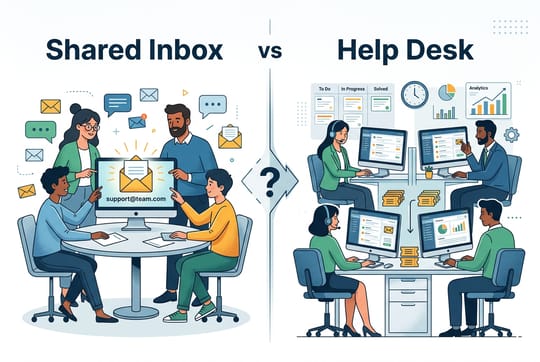
Your support inbox is overflowing. Customers wait too long. Your team replies to the same emails twice while other messages fall through the cracks.
Sound familiar?
This pushes many teams toward a big choice: stick with an email collaboration tool or move to a full help desk. The right answer depends on your team. A tool that works for a five-person startup could slow down a 50-person support team with needless complexity. A small team might pay for features they never touch.
The shared inbox vs help desk choice comes down to two things. Where does your team stand today? Where is it headed? A shared inbox keeps things simple, familiar, and fast. A help desk adds structure, automation, and room to grow.
Email still drives over 90% of support requests for many companies. Before choosing a tool, it helps to understand the fundamentals of supporting customers. Yet growing teams hit limits that only a ticketing system can solve. This help desk software comparison walks through the real differences, strengths, and trade-offs so you can make the right call.
What Is the Difference Between a Shared Inbox and a Help Desk?
What is a Shared Inbox?
A shared inbox is a single email address that your whole team can access. Think [email protected]. Everyone on the team sees incoming messages and can reply from the same account.
The appeal is simplicity. There is no new interface to learn. Setup takes minutes, not days. Your team works in a familiar email environment. Messages arrive, someone claims them, and responses go out.
Most shared inbox solutions add lightweight features on top of email. These include internal notes, assignments, and basic collision detection. SupportBee keeps that email-like feel while adding tools like comments and team assignments. You get structure without learning an entirely new system.
A shared inbox works best for teams of 1 to 10 agents who want simple collaboration without enterprise overhead.
What is a Help Desk?
A help desk turns customer messages into structured tickets. Each inquiry gets a unique ID, a status, a priority level, an owner, and a full history. The focus shifts from managing email to managing workflows.
Help desks shine at scale. They offer automation rules, SLA tracking, canned responses, and multi-channel support. You run a support operation with clear processes and metrics. The trade-off is complexity. Setup takes longer. Training costs go up. And monthly costs climb quickly as you add features and agents. If you are exploring help desk options, our guide to the best help desk software for small businesses compares the top choices.
Shared Inbox vs Help Desk: Quick Comparison
| Feature | Shared Inbox | Help Desk |
|---|---|---|
| Setup time | Minutes | Days to weeks |
| Learning curve | Low (feels like email) | Medium to high |
| Best team size | 1-10 agents | 10-100+ agents |
| Ticket volume | Up to ~200/day | 200-5,000+/day |
| Automation | Basic rules and tags | Advanced workflows, triggers, macros |
| Reporting | Volume and response times | Full analytics, SLA tracking, CSAT |
| Channels | Email (some add chat) | Email, chat, social, phone |
| Cost per agent | $-$$ | $$-$$$$ |
| Personalization | High (feels human) | Lower (feels like a ticket system) |
| SLA tracking | Manual | Automatic with alerts |
What Features Does Each Tool Offer?
Collaboration and Internal Notes
Shared inboxes let your team work together without customers seeing the back-and-forth. Private comments help agents discuss tricky issues, loop in specialists, or ask questions. The customer only sees the final reply. These email collaboration features are what set a shared inbox apart from a basic group alias.
Help desks offer internal notes too, but they often sit behind more complex screens. You might click through ticket details, tabs, and sidebars to find them. For small teams that value speed, this extra friction adds up over hundreds of daily messages.
Visibility works differently in each tool. In a shared inbox, everyone sees everything by default. No one wonders what a teammate handled yesterday. Help desks split visibility through queues, views, and permissions. This helps at scale but can create blind spots in smaller teams.
Ticketing and Automated Workflows
This is where help desks pull ahead for complex operations. Ticketing systems assign unique IDs, track resolution times, and keep full audit trails. For a deeper look at options in this space, see our roundup of the best email ticketing systems. You can build rules like: if a message says "refund," assign it to billing and set priority to high.
Advanced help desks offer macros, triggers, SLA policies, and skills-based routing. Modern AI features help teams resolve issues up to 44% faster through smart automation. These tools matter when you handle hundreds of tickets daily across product lines.
Shared inboxes offer lighter automation. You might get basic assignment rules or simple tagging. You won't find the workflow builders that enterprise platforms provide. For many small teams, this is a relief. Less setup means less maintenance and fewer things that break.
Reporting and Performance Metrics
Help desks deliver deep reporting out of the box. You see first response times, resolution rates, agent output, and customer satisfaction scores. This data drives staffing decisions and helps justify headcount.
Shared inbox reporting stays simple: volume trends, response times, and basic team activity. You won't get the detailed breakdowns that large operations need. But many small teams never check those reports. If you run a lean operation, basic metrics tell you what you need to know. For guidance on which numbers matter most, see key customer satisfaction metrics to track.
How Does Team Size Affect the Choice?
Small Teams (1-10 Agents)
A three-person support team does not need enterprise software. The cost of managing complex systems, keeping automation rules updated, and training new hires on big platforms outweighs any gains. Shared inboxes let small teams move fast with low friction.
SupportBee shows this approach in action. It bundles help desk ticketing, a knowledge base, and a customer portal into a tool that takes minutes to set up. You get the core tools for teamwork without the bloat of platforms built for 500-agent call centers.
Growing and Enterprise Teams (10+ Agents)
Enterprise support faces different problems. When you manage dozens of agents across time zones, handle many product lines, and enforce strict SLAs, a full help desk becomes a must. Skills-based routing sends technical questions to technical experts. Tiered levels keep senior agents off basic password resets. Internal teams — IT, HR, facilities — face the same scaling challenge. A dedicated internal ticketing system brings structure to employee requests, while larger IT organisations move to ITSM ticketing tools once incident, problem, and change management need to be formalised.
High Ticket Volumes and SLA Tracking
Volume changes everything. At 50 tickets per day, a shared inbox handles the load just fine. At 500 per day, you need queues, auto-prioritization, and SLA breach alerts to prevent chaos.
Help desks track SLA compliance on their own. They flag tickets nearing their deadline, escalate overdue items, and report where your team falls short. AI tools can cut call time by up to 45% through smart suggestions. This matters at scale.
Shared inboxes lean on human judgment. Your team decides what is urgent based on context, not rules. This works when volume stays manageable and your team knows your customers well enough to prioritize on the fly.
How Does Each Option Affect Customer Experience?
Personal Emails vs. Standardized Responses
Customers notice the difference between a personal email and a ticket reply. Shared inboxes keep that human, conversational tone. Replies come from real people in a familiar email format. There is no ticket number in the subject line. No "Your request #47392 has been updated" alerts.
Help desks bring consistency through templates. Every agent gives accurate info. Canned responses speed up common questions. But this can feel cold. Customers sometimes feel they are talking to a system, not a person.
Your best choice depends on your customer base. High-touch B2B services often benefit from the personal feel of a shared inbox. High-volume consumer support may need the speed of templated help desk replies.
Omnichannel Support
Modern help desks pull all channels into one view. Email, chat, social media, and phone all feed into the same system. Agents see full customer histories without switching tabs.
Shared inboxes focus on email. Some add chat, but few offer full omnichannel support. If your customers reach out only through email, this is fine. If they expect help across Instagram, live chat, and phone, a help desk serves them better.
What Does Each Option Cost?
Budget shapes software decisions, especially for growing teams. Shared mailboxes under 50 GB do not need separate Microsoft 365 licenses. This makes basic shared inbox setups free for teams already on Microsoft. See our Office 365 shared mailbox best practices for tips on getting the most out of that setup.
Dedicated shared inbox tools like SupportBee cost a fraction of enterprise help desk platforms. You pay for collaboration features, not complex automation you will never set up.
Help desk pricing adds up fast. Base plans look affordable, but key features often hide behind higher tiers. SLA tracking, advanced reporting, and AI features may need enterprise plans. A 10-person team can face monthly costs that beat what a shared inbox charges per year.
Setup effort follows the same pattern. Shared inboxes get you running in minutes. Help desks need time for building queues, writing automation rules, setting up integrations, and training your team. That investment pays off at scale. For smaller teams, it is pure overhead.
Final Verdict: Which Should You Choose?
Whether you frame it as help desk vs shared inbox or shared inbox vs ticketing system, the question comes down to three things: team size, ticket volume, and how much complexity you can handle.
Choose a shared inbox if you:
- Have 1-10 agents
- Handle fewer than 200 tickets per day
- Want fast setup and a low learning curve
- Value personal, human replies
- Mainly support customers over email
Choose a help desk if you:
- Have 10+ agents across time zones
- Handle 200+ tickets per day
- Need SLA tracking and compliance alerts
- Support customers across many channels
- Want advanced automation and routing
Many teams find a middle ground. SupportBee gives you help desk features through an interface that works like email. You get ticketing, a knowledge base, and a customer portal in a package that takes five minutes to deploy.
Start with your real problems, not what you might need someday. If your current setup works but needs better teamwork, a shared inbox upgrade solves that. If you are buried in complexity and need workflow automation, a help desk makes sense. Match the tool to where you are today.
Start your free 14-day trial - no credit card required.
Frequently Asked Questions
When should I switch from a shared inbox to a help desk?
Watch for these signs: duplicate replies, missed messages, or SLA breaches. Common triggers include growing past 10 agents, handling more than 200 tickets daily, or needing support beyond email. If your team spends more time coordinating than helping customers, a help desk will pay off.
Can a shared inbox handle ticketing?
Yes. Many modern shared inbox tools include lightweight ticketing. They offer assignment, status tracking, and internal notes. SupportBee, for example, provides ticketing through a familiar email interface. The gap from full help desks is the lack of advanced automation, skills-based routing, and multi-tier escalation.
Is a help desk worth the cost for a small team?
For most teams under 10 agents, no. You will spend time setting up features you never use. You will train agents on unfamiliar screens. A shared inbox with collaboration tools covers the basics at a fraction of the cost. Your team gets productive right away.
What are the disadvantages of a shared mailbox?
Shared mailboxes have limits. They lack SLA tracking, advanced reporting, and multi-channel support. As volume grows, you lose track of who replied to what. There is no skills-based routing. And without automation, your team must sort and assign messages by hand. These gaps start to hurt once you pass 10 agents or 200 tickets per day. Teams that try to stretch Outlook into a help desk run into specific problems even sooner.
What are the disadvantages of a help desk?
Help desks bring complexity. Setup takes days or weeks. Training costs are higher. Monthly pricing adds up fast, especially for advanced features. Agents may feel bogged down by required fields, ticket forms, and rigid workflows. Customers may notice a less personal tone in replies. For small teams, the overhead often outweighs the benefits.
Is the help desk still in demand?
Yes. Help desk software remains a growing market. The rise of AI, omnichannel support, and remote work has increased demand. Businesses that handle high volumes or need SLA compliance still depend on help desk tools. The shift is toward simpler, hybrid tools that combine help desk power with shared inbox ease of use.
What if my team needs both simplicity and structure?
Tools like SupportBee bridge this gap. They offer help desk features (ticketing, knowledge base, customer portal) through an interface that feels like email. You get assignment workflows, internal notes, and performance tracking without the steep learning curve. This approach works well for teams of 3 to 15 agents.
What is the difference between a shared inbox and a ticketing system?
A shared inbox keeps email at the center. Your team reads, assigns, and replies from one mailbox. A ticketing system converts every message into a numbered ticket with a status, priority, and audit trail. Some tools blend both approaches. SupportBee, for example, gives you ticket tracking through an interface that still looks and feels like email. The right choice depends on whether your team needs workflow automation or prefers lightweight collaboration.
How do I compare help desk software for a small team?
Start with three questions. First, how many agents need access? Tools priced per seat add up fast. Second, which channels do your customers use? If email covers 90% of requests, you do not need omnichannel support. Third, what is your daily ticket volume? Under 200 per day, a shared inbox handles the load. Over 200, look for SLA tracking, automation, and queue management. Our help desk software comparison breaks down the top options by these criteria.
How do I measure whether my current tool is working?
Track three things: first response time, resolution time, and customer satisfaction. If response times climb, tickets get missed, or satisfaction drops, your tool may not be keeping up. Also watch for agent frustration. If your team fights the tool instead of using it, that is a strong signal to switch.