Turn Support Tickets into Asana Tasks
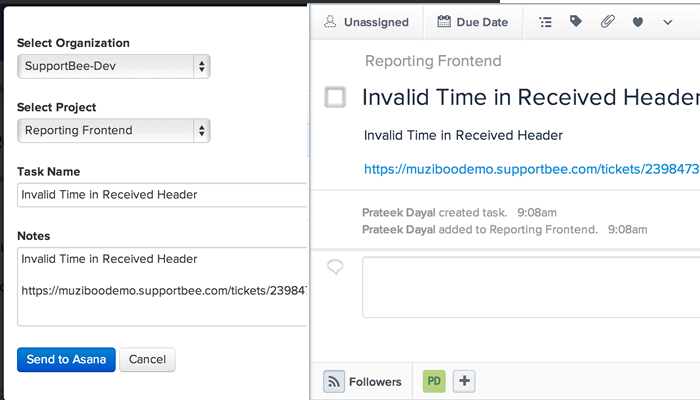
SupportBee's Asana integration connects your ticketing system with Asana projects. When a customer emails your support team and the issue needs action from product, engineering, or operations, send it to Asana as a task — directly from SupportBee's shared inbox.
Why You Need a Ticketing System with Asana
Asana is a powerful project management tool, but it wasn't designed for customer support. It lacks a shared inbox, collision detection, SLA tracking, and the email-to-ticket workflow that help desk teams depend on. Teams that try to manage support requests inside Asana end up with missed emails, duplicate work, and no way to track response times.
A dedicated ticketing system like SupportBee handles the customer support workflow: converting emails into trackable tickets, assigning them to agents, and managing resolution through the ticket management pipeline. The Asana integration bridges the gap — support stays in SupportBee while project work stays in Asana, and information flows between both tools automatically.
Here are common scenarios where this helps:
- A customer reports a bug that developers need to fix, tracked as an Asana task
- A feature request arrives via email and the product team adds it to their Asana backlog
- A billing question needs input from finance, who manage their work in Asana
- A support agent escalates a technical issue without leaving the help desk
How the Asana Help Desk Integration Works
The integration adds a "Send to Asana" action inside every support ticket in SupportBee. Click it, and the ticket content — subject, body, customer details — becomes an Asana task in the project you choose.
The Asana task includes the full ticket context: the customer's message, any attachments, and a link back to the original ticket. Your project team can work on the issue in Asana without needing access to the help desk, while support agents track progress without switching tools.
This means your customer support team and project teams stay in sync. Support agents don't need Asana access. Developers and project managers don't need access to the ticketing system. Each team works in their preferred tool while information flows between them.
Setting Up the Asana Ticketing System Integration
Connecting SupportBee with Asana takes about two minutes:
- Go to Admin → Integrations in SupportBee
- Search for Asana and click Add to My SupportBee
- Authorize SupportBee to access your Asana workspace
- Select the Asana project where you want tasks to be created
- Configure which ticket details to include in the Asana task
No API keys to generate and no webhooks to configure. Once connected, every agent on your team can send tickets to Asana with a single click.
Turning Support Tickets into Asana Tasks
Once the integration is active, here is how the workflow looks:
- Open a ticket in SupportBee's team inbox
- Click Integrations → Send to Asana
- Review and edit the task title and description
- Choose the target Asana project and assignee
- Send
The ticket content appears in Asana immediately. Your project team sees the full customer context — the original email, any attachments, and the ticket link — and can take action without needing access to your help desk.
Who Uses SupportBee with Asana
This integration works well for teams where customer support and project management need to stay aligned:
- Software teams that escalate bug reports from the help desk to developers tracking work in Asana
- Product teams that funnel feature requests from customer support into their Asana roadmap
- Agencies that track client requests as Asana tasks while managing support through a dedicated ticketing system
- Operations teams where customer feedback needs to reach the people planning and executing projects
- Any team that uses Asana for internal work but needs a help desk that handles inbound email at scale for customer-facing support
- Teams comparing options can review PM integrations for customer support teams and leading help desk software before settling on a stack
Asana Customer Support Made Simple
Trying to handle customer support directly in Asana means building custom forms, writing automation rules, and still missing features like collision detection, canned responses, and a knowledge base. SupportBee gives your support team the tools they need while the Asana integration keeps your project teams in the loop.
SupportBee starts at $17/user/month and includes the Asana integration on all plans. Pair it with other integrations like Slack, Trello, or GitHub to build a complete support workflow.






From our blog
Guides and comparisons to help you choose the right support tools.


Try the Asana integration free
Set up SupportBee in under five minutes. No credit card required.
Start Free Trial