Add Ticket Numbers to Customer Replies
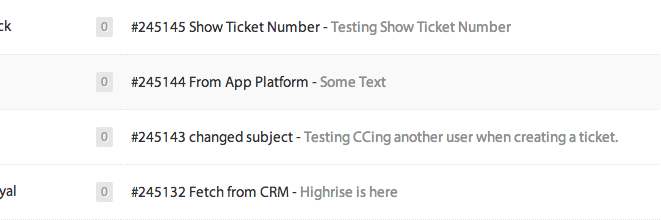
SupportBee's Show Ticket Number integration adds a unique reference number to every reply your team sends. The ticket number appears in the email so customers can quote it in follow-up messages, phone calls, or chats. It gives both sides a simple way to find and reference specific conversations.
SupportBee is designed around email simplicity - no clunky ticket IDs cluttering the subject line. But some businesses need reference numbers. Regulated industries, B2B support teams, and companies with phone-plus-email workflows often require a tracking number that customers can cite when they call back.
How Ticket Numbers Work
When this integration is enabled, SupportBee inserts the ticket's unique ID into every outgoing reply. The number appears in the email body so the customer sees it clearly.
Here is what happens:
- A customer emails your support address
- SupportBee creates a ticket and assigns it a unique number
- Your agent replies to the customer
- The reply automatically includes the ticket number
- The customer can reference this number in future emails or phone calls
- Your team searches by ticket number to find the conversation instantly
The ticket number is consistent across the entire conversation. Every reply in the thread includes the same reference number, making it easy for customers to track their issue.
Why Use Ticket Numbers
Not every team needs ticket numbers. SupportBee works great without them for many businesses. But here are the cases where they add real value.
Phone and email support. When a customer calls about an open issue, they can give the agent their ticket number. The agent searches SupportBee and pulls up the full history instantly - no asking for the customer's email, name, or description of the problem.
Compliance and audit trails. Industries like finance, healthcare, and legal often require reference numbers for every support interaction. Ticket numbers create a clear, citable record.
B2B support with multiple contacts. When several people at the same company contact support, ticket numbers help everyone reference the same conversation. A manager can ask about "ticket 4521" and your team knows exactly which issue they mean.
Escalation workflows. When a ticket moves between agents, teams, or departments, a reference number makes handoffs cleaner. Instead of forwarding email threads, team members search the ticket number and pick up where the last agent left off.
Customer-facing SLAs. If your support agreement promises resolution within a certain timeframe, ticket numbers let customers track and reference specific commitments.
Setting Up Show Ticket Number
Setup takes less than a minute:
- Open your SupportBee admin panel and go to Integrations
- Find Show Ticket Number under the Workflow section
- Click Add to enable it
- All future agent replies will include the ticket number
The integration applies to all outgoing replies across all your inboxes. Ticket numbers are system-generated and unique - your team does not need to create or manage them.
More Workflow Integrations



From our blog
Guides and comparisons to help you choose the right support tools.



Try the Show Ticket Number integration free
Set up SupportBee in under five minutes. No credit card required.
Start Free Trial