PostHog Integration for Customer Support
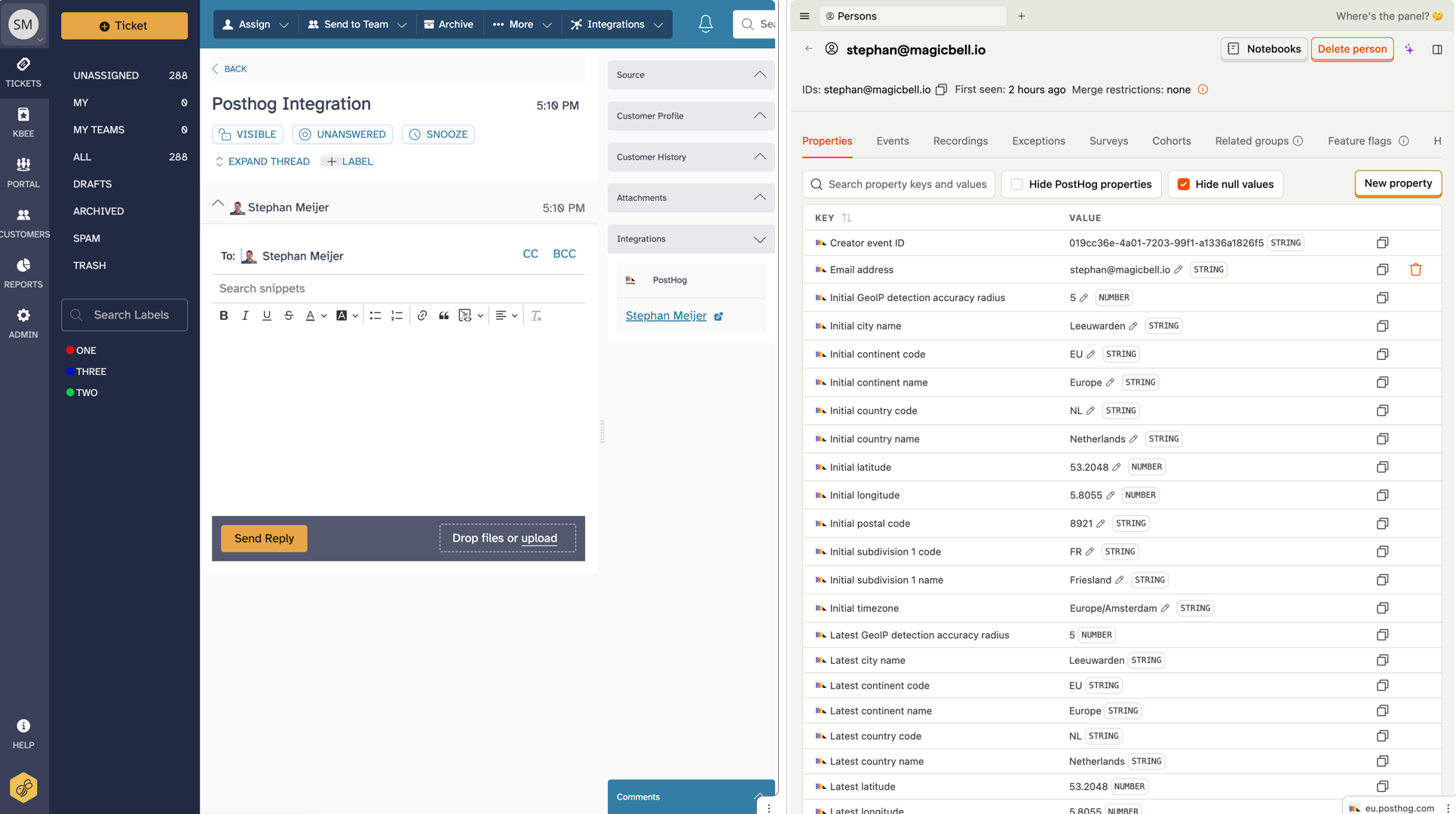
SupportBee's PostHog integration brings product analytics into your support workflow. When a customer writes in, you can see their PostHog profile - session recordings, feature flags, events, and usage patterns - right from the ticket. No tab switching, no asking the customer to describe what happened.
PostHog is an open-source product analytics platform that tracks user behavior with event data, session replays, and feature flags. By connecting it to SupportBee, your support team gets the context they need to resolve issues faster and give better answers.
How the PostHog Integration Works
Once connected, SupportBee matches incoming tickets to PostHog user profiles using the customer's email address. When an agent opens a ticket, they see a link to the customer's PostHog profile with their recent activity.
What your support team can access:
- Session replays - Watch exactly what the customer did before writing in. See clicks, page views, and errors in real time.
- Event timelines - View the sequence of actions the customer took. Useful for reproducing bugs or understanding workflows.
- Feature flags - Check which features are enabled for this user. Quickly determine if a problem is related to a flag rollout.
- User properties - See plan type, signup date, company, and any custom properties you track in PostHog.
This context turns guesswork into informed support. Instead of asking "Can you describe what you were doing?", your agent already knows.
Why Connect PostHog to Your Help Desk
Support teams that see product data resolve tickets faster and escalate fewer issues.
Reproduce bugs without back-and-forth. Session replays show exactly what went wrong. Your agent can watch the customer's session, spot the error, and either fix it or send a detailed bug report to engineering - all from one ticket.
Spot patterns across tickets. When multiple customers report similar issues, PostHog data helps you confirm whether it is the same bug, a confusing UI, or a feature gap. Cross-reference ticket themes with product events to find root causes.
Personalize support responses. Knowing a customer's plan, usage level, and feature access lets agents tailor their answers. A power user gets a different response than someone who signed up yesterday.
Close the loop with product teams. When you escalate a ticket to engineering via Linear, GitHub Issues, or Asana, include the PostHog session link. Engineers get full reproduction steps without playing telephone through support.
Setting Up the PostHog Integration
Setup takes about five minutes:
- Open your SupportBee admin panel and go to Integrations
- Find PostHog and click Add
- Enter your PostHog project API key and instance URL
- Map the email field so SupportBee can match tickets to PostHog users
- Save and verify by opening a ticket from a known PostHog user
Once active, every ticket from a matched user shows their PostHog profile link. Agents click through to see the full analytics view alongside the ticket in SupportBee's shared inbox.
When Analytics Meets Customer Support
The most useful support teams do more than answer questions. They feed insights back to the product. With PostHog data attached to support tickets, your team can:
- Flag usability issues backed by session replays
- Identify features that generate the most confusion
- Track whether product changes reduce ticket volume
- Report on customer satisfaction metrics alongside product usage trends
- Collect structured customer feedback alongside product analytics to triangulate root causes
- Connect support analytics to the customer success angle on product analytics for a fuller picture of customer health
From our blog
Guides and comparisons to help you choose the right support tools.



Try the PostHog integration free
Set up SupportBee in under five minutes. No credit card required.
Start Free Trial