Pipedrive CRM Customer Service Integration
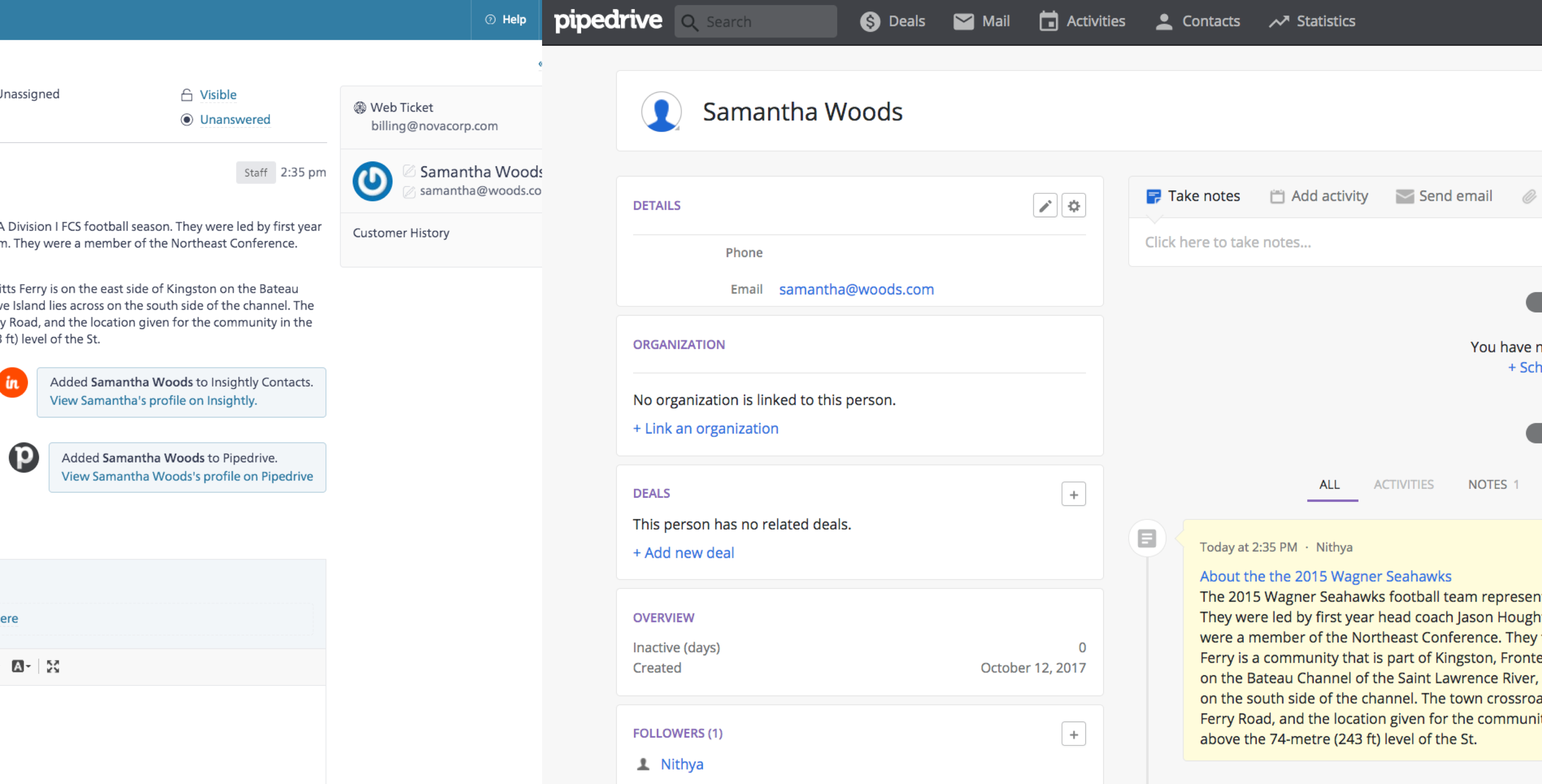
SupportBee's Pipedrive integration connects your ticketing system with Pipedrive CRM. Every time a customer emails your support team, SupportBee automatically looks up their profile in Pipedrive and shows their sales context right inside the ticket - deal stage, contact history, and a direct link to their Pipedrive profile.
Why You Need a Ticketing System with Pipedrive
Pipedrive is built for sales pipeline management - not customer support. The main goal of CRM software is to move deals forward, which means Pipedrive has no shared inbox, no collision detection, no SLA tracking, and no email-to-ticket workflow. Sales teams that try to handle support requests inside Pipedrive lose track of conversations, miss follow-ups, and clutter their pipeline with non-sales work.
A dedicated ticketing system like SupportBee handles the customer support workflow: converting emails into trackable tickets, assigning them to agents, and managing resolution. The Pipedrive integration bridges the gap - support agents see sales context without leaving the help desk, and your CRM stays updated without manual data entry.
Here is when this matters most:
- A long-time customer emails about a billing issue, and the agent instantly sees their deal value and account status in Pipedrive
- A prospect asks a pre-sales question, and the support team can see where they are in the sales pipeline before responding
- A new contact emails support for the first time, and Pipedrive automatically gets a new contact record
- Your sales team stays informed about support interactions without needing access to the help desk
How the Pipedrive Ticketing System Integration Works
The integration runs automatically on every new ticket. When a customer emails your support team, SupportBee looks up their email address in Pipedrive. If a matching contact exists, the integration posts a comment on the ticket with the customer's Pipedrive profile - including a direct link so agents can view the full sales history.
If no matching contact exists in Pipedrive, the integration can create one automatically. This keeps your CRM complete without anyone entering data manually.
You can also send the full ticket contents to Pipedrive. When enabled, each new ticket from a contact adds notes to their Pipedrive profile - including the message body and attachments. Your sales team sees every support interaction on the customer's timeline without switching tools.
Setting Up the Pipedrive Integration
Connecting SupportBee with Pipedrive takes about two minutes:
- Go to Admin - Integrations in SupportBee
- Search for Pipedrive and click Add to My SupportBee
- Authorize SupportBee to access your Pipedrive account
- Choose whether to create new contacts in Pipedrive for unknown customers
- Choose whether to send full ticket contents to Pipedrive as notes
No API keys to generate and no webhooks to configure. Once connected, the integration runs on every new ticket automatically.
What Your Agents See
Once the integration is active, your support workflow gets CRM context without any extra steps:
- A customer sends an email to your support address
- SupportBee creates a ticket and assigns it through your normal workflow
- The integration automatically checks Pipedrive for the customer's profile
- A comment appears on the ticket with the customer's Pipedrive details and a direct link
- Your agent responds with full sales context - no tab switching needed
This means support agents answer questions faster and give more relevant responses. They know whether they are talking to a prospect in trial, a paying customer on a premium plan, or a churned account - all from the ticket view in your team inbox.
Who Uses SupportBee with Pipedrive
This integration works well for teams where sales and support need shared customer context:
- SaaS companies where support agents need to know a customer's subscription tier and deal history before responding
- Sales-driven teams that want their CRM updated with support interactions automatically and track the metrics that matter for sales-driven support teams alongside pipeline KPIs
- Small businesses that use Pipedrive for sales but need an email-based help desk for customer-facing support
- Account management teams where knowing a customer's pipeline stage helps prioritize and personalize support responses
SupportBee starts at $17/user/month and includes the Pipedrive integration on all plans. Pair it with other integrations like Slack, Insightly, or Capsule CRM to build a complete support workflow that keeps your CRM in sync.
More CRM Integrations





From our blog
Guides and comparisons to help you choose the right support tools.



Try the Pipedrive integration free
Set up SupportBee in under five minutes. No credit card required.
Start Free Trial